
|
|
| Aeon Spriting Tutorial Tuesday, July 6, 2010 5:23 pm — Guide posted by Kittikiyana |


 ShareThis
« Kittikiyana's Blog
LAST UPDATED: 20/08/2010
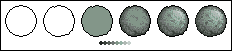
NOTE: I am using Paint* for this tutorial. Paint is good enough for sprites, but you can adapt this to, say, Photoshop.
I'll be teaching you how to sprite a boulder!
1. Using the circle tool, draw a circle. It'll suffice... but it looks a bit too perfect for a boulder. So, move on to the next step.
2. Using the brush or pencil tool, add a few bumps to the lineart. Now it looks less perfect, which, just so you know, is a good thing.
3. Fill the boulder in with one colour. Boulders aren't completely gray; in some cases, they can have a greenish tent. When you choose the right colour, move to the next step.
4. Choose a lightsource. In this case, it's from the top-right. So, the shadows will be on the opposite side. Draw in the shadows.
5. Now for the highlights. The lightsource is from the top-right, so that's where the highlights will be. When you're finished with this step, you can call your sprite done; however, I want to add a bit more. If you want to perfect it, move on to the next step.
6. (This step is optional.) Add a few bumps and cracks on it, if you'd like. Then tweak it slightly. You're done!
*The version that comes with XP and below, not the one that comes with Windows 7.
Want to learn more?
Useful MS Paint Tricks
Mark's Pixel Art Tutorial
Useful Free Programs
Irfanview
GNU Image Manipulation Program (GIMP)
Paint.NET
Kolourpaint
User Comments (11)
| Livio | ||
Age: 31 Karma: 470 Posts: 9620 Gender: Male Location: Arizona, USA pm | email |
wow this is cool.  You make it look so simple, and yet, I don't really know what I'm talking about because I've never tried this. You make it look so simple, and yet, I don't really know what I'm talking about because I've never tried this. | |
| Sefro | ||
Karma: 313 Posts: 1136 Gender: Male Location: Canada pm | email |
You are a very impressive artist. | |
| krotomo | ||
| The Shepherd Age: 23 Karma: 249 Posts: 4066 Gender: Male Location: My chair pm | email |
This is AMAZING. And you know the best part? It can almost work with everything! You just have to think about what you want it to look like in the end and can follow these instructions except with the other object. | |
| shos | ||
| ~Jack of all trades~ Age: 31 Karma: 389 Posts: 8273 Gender: Male Location: Israel pm | email |
this is some awsome paint graphics kitti. you should be a real designer or something. imo, in this rate, you should be the one drawing all our aeon stuff.  | |
| jellsprout | ||
| Lord of Sprout Tower Karma: -2147482799 Posts: 6445 Gender: Male pm | email |
I personally suggest GIMP or Paintshop instead of Paint. The colour selector in Paint is too limited. And don't choose any of the preset colours other than black or white. Just don't. Ever. But this guide is very good. Especially step 4 and 6. When I first read a small guide about spriting, the first thing they said was to pick a lightsource. It easily makes the sprite look more realistic. And details are important. You nearly always need to add smears or dots to make a sprite look good. Avoid large, plain areas. Spoiler: | |
| Silver | ||
Karma: 121 Posts: 3581 Gender: Female pm | email |
'jellsprout' said: I personally suggest GIMP or Paintshop instead of Paint. The colour selector in Paint is too limited. And don't choose any of the preset colours other than black or white. True, true, but double-clicking a color or picking the option in "Edit Colors" allows you to make your own color (well, almost). Paint is also much, much more simpler. I make all of my computer drawings/sprites/etc. on Paint, and there isn't much of a problem with them, is there? | |
| jellsprout | ||
| Lord of Sprout Tower Karma: -2147482799 Posts: 6445 Gender: Male pm | email |
I don't think it is possible to select a colour from the picture with the eyedrop tool and edit that with Paint, which is something I often use in GIMP. Spoiler: | |
| Kittikiyana | ||
| Dogga Age: 25 Karma: 66 Posts: 59 Gender: Female Location: Llanfair-pwllgwyngyllgogery-chwyrndrobwlllla... (not really) pm | email |
Actually, you can. Pick a colour with the eyedropper, then go to the menu and select Colours, then Edit Colours. It's very handy and I use it a lot.  Spoiler: | |
| jellsprout | ||
| Lord of Sprout Tower Karma: -2147482799 Posts: 6445 Gender: Male pm | email |
You learn something new every day. Spoiler: | |
| Isa | ||
| No. I'm an octopus. Age: 31 Karma: 686 Posts: 7833 Gender: Male Location: Uppsala, Sweden - GMT +1 pm | email |
Image is gone  | |
| Livio | ||
Age: 31 Karma: 470 Posts: 9620 Gender: Male Location: Arizona, USA pm | email |
and now it's back! Now that's it's back, I'm gonna upload it to the site to make sure nothing happens to it again. | |





« Forum Index < The Interguild Board
In order to post in the forums, you must be logged into your account.
Click here to login.
All games copyrighted to their respective owners.